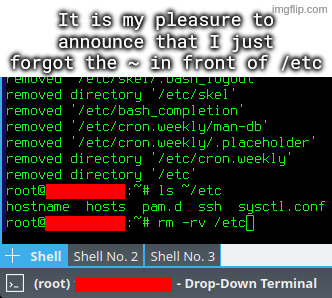
I accidentally untarred archive intended to be extracted in root directory, which among others included some files for /etc directory.
I went on to rm -rv ~/etc, but I quickly typed rm -rv /etc instead, and hit enter, while using a root account.
💀
Next time:
ls ~/etc rm -rv !$Reminds me of when I had a rogue
~directory sitting in my own home directory (probably from a badly written script). Three seconds intorm -rf ~and me wondering why it was taking so long to complete, I CTRL+C, reboot, and pray.Alas, it was a reinstall for me that day (good excuse to distro hop, anyway). Really glad I don’t mount my personal NAS folder in my home directory anymore, holy shit.
Bruh
Genuinely curious… why using root for operations like these?
To feel the thrill
Thank god you used -rv and not -rf 😂😂😂
I am new to Linux and just getting somewhat comfortable as my daily driver, very proud of myself that I got the joke pretty quickly :)
Sudo apt-get install /etc
Ok speaking of this, where do a distro’s config and boot scripts even come from? Are they in a package? Like on Debian so the .debs have metadata that can add cron jobs and such?
Yup
OOOOOOOOOOOF!!
One trick I use, because I’m SUPER paranoid about this, is to mv things I intend to delete to /tmp, or make /tmp/trash or something.
That way, I can move it back if I have a “WHAT HAVE I DONE!?” moment, or it just deletes itself upon reboot.
Also stealing this. What an awesome tip
i always do “read;rm ./file” which gives me a second to confirm and also makes it so i don’t accidentally execute it out of my bash history with control-r
Just get a cli trash tool and alias it to rm. Arch wiki
That’s certainly something you can do! I would personally follow the recommendation against aliasing rm though, either just using the trash tool’s auto complete or a different alias altogether.
Reason being as someone mentioned below: You don’t want to give yourself a false sense of security or complacency with such a dangerous command, especially if you use multiple systems.
I liken it to someone starting to handle weapons more carelessly because the one they have at home is “never loaded.” Better safe than sorry.
Lol we should have “rules of rm safety”:
- Assume rm is always sudo unless proven otherwise.
- (EDIT)Finger should be off the Enter key until you are certain you are ready to delete.
- Never point rm at something you aren’t willing to permanently destroy.
- Always be aware of your target directory, and what is recursively behind it!
I think this is the best approach. I’ve created a short alias for my trash tool and also aliased
rmto do nothing except print a warning. This way you train yourself to avoid using it. And if I really need it for some reason I can just type\rm.If you want to train yourself even more effectively you can also alias
rmto runslinstead :)
Hey that’s a pretty good idea. I’m stealing that.
After being bitten by rm a few times, the impulse rises to alias the rm command so that it does an
“rm -i”or, better yet, to replace the rm command with a program that moves the files to be deleted to a special hidden directory, such as~/.deleted. These tricks lull innocent users into a false sense of security.I’ve read this somewhere too! Where are you quoting it from if I may ask?
But yes I also agree 💯%. rm should always be treated with respect and care by default rather than “customizing the danger away.”
Quoting from Linux Hater’s Handbook, lovely read
EDIT: UNIX Haters, not Linux hater, my bad
… is it the “UNIX-Hater’s Handbook” from 1994 with a parody of “The Scream” on the cover?
Yup, that one. It’s also available here, sans cover - https://web.mit.edu/~simsong/www/ugh.pdf
LOL nice, I’ll have to check it out. :) Thanks!
This need’s to be higher in the comments!
That’s what tools like trash-cli are for.
Yeah, same thing like with unclosed bottles, cup too close to the table edge, etc.: Accidents that can hapen, will happen.
Better name them something else in your user dir.And yes, painful experience.
Ohohoho man did you ever fuck up. I did that once too. I can’t remember how I fixed it. I think I had to reinstall the whole OS
I’ve had a combination of tab complete and filename spaces lead to things like
rm Some\ Common\ Prefix *at least three times. Instant regret. I’ve now got a pretty good intuitive reflex around this type of thing. You eventually get enough callouses.Be happy that you didn’t remeber the ~ and put a space between it and etc😃.
Ahh, the rites of passage!
Reusing names of critical system directories in subdirectories in your home dir.

I’ll provide some cover. This is my current home directory:
bin/ bmp/ cam/ doc/ eot/ hhc/ img/ iso/ mix/ mku/ mod/ mtv/ mus/ pkg/ run/ src/ tmp/ vid/ zim/. It’s your home directory, enjoy it however you like.Oh, my! Perfect use of that scene. I don’t always lol, when I say lol. But I lol’ed at this for real.
I agree with this take, don’t wanna blame the victim but there’s a lesson to be learned.
except if you read the accompanying text they already stated the issue by accidentally unpacking an archive to their user directory that was intended for the root directory. that’s how they got an etc dir in their user directory in the first place
Could make one archive intended to be unpacked from /etc/ and one archive that’s intended to be unpacked from /home/Alice/ , that way they wouldn’t need to be root for the user bit, and there would never be an etc directory to delete. And if they run tar test (t) and pwd first, they could check the intended actions were correct before running the full tar. Some tools can be dangerous, so the user should be aware, and have safety measures.
they acquired a tar package from somewhere else. the instructions said to extract it to the root directory (because of its file structure). they accidentally extracted it to their home dir
that is how this happened. not anything like what you were saying
[OP] accidentally untarred archive intended to be extracted in root directory, which among others included some files for /etc directory.
I dunno, ~/bin is a fairly common thing in my experience, not that it ends up containing many actual binaries. (The system started it, miss, honest. A quarter of the things in my system’s /bin are text based.)
~/etc is seriously weird though. Never seen that before. On Debians, most of the user copies of things in /etc usually end up under ~/.local/ or at ~/.filenamehere
It should be ~/.local/bin
~/bin is the old-school location from before .local became a thing, and some of us have stuck to that ancient habit.
I think the home directory version of etc is ~/.config as per xdg.
I use ~/config/* to put directories named the same as system ones. I got used to it in BeOS and brought it to LFS when I finally accepted BeOS wasn’t doing what I needed anymore, kept doing it ever since.
So, you don’t do backups of /etc? Or parts of it?
I have those tars dir ssh, pam, and portage for Gentoo systems. Quickset way to set stuff up.
And before you start whining about ansible or puppet or what, I need those maybe 3-4 times a year to set up a temporary hardened system.
But may, just maybe, don’t assume everyone is a fucking moron or has no idea.
Edit Or just read what op did, I think that is pretty much the same
But may, just maybe, don’t assume everyone is a fucking moron or has no idea.
Well, OP didn’t say they used Arch, btw so it’s safe to assume.
(I hate that this needs a /s)